UoftCTF Writeup


This is a simple challenge, but I'll talk a bit about angr and symbolic execution for newbies.
Initial Look
For the challenge handout we've been given a simple flag checker binary named checker. When simply running it and testing it, its asks for user input and rejects/accepts it, pretty standard and nothing fancy so far. Running file on this reveals that it's a statically compiled binary but the section header is missing which is not a good sign.
After this I decided to open this in IDA to have a better look at what it's doing, but when I opened it in IDA I noticed something very strange. The binary only has 5-6 functions:
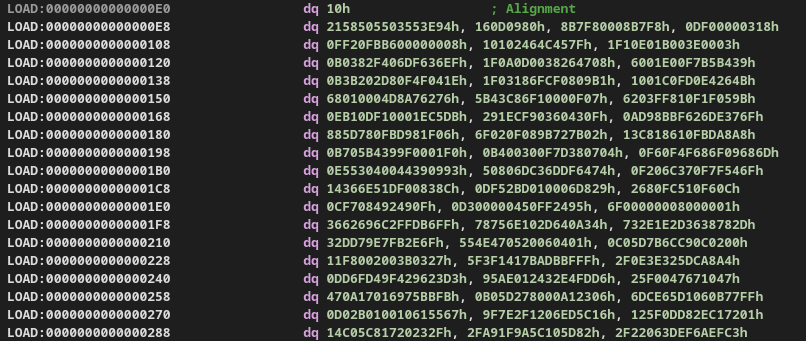
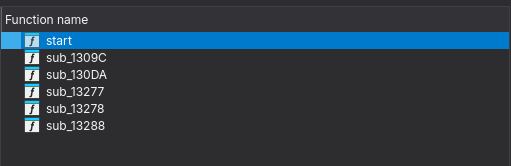 and there is a big blog of bytes possibly our code which has been laid out as bytes, but if we simply try to convert these bytes into code using IDA it gives us obscure instructions, so we're probably missing something.
 But if we look at the Strings in this binary it gives away why this binary looks so weird. Looking at this string:
 $Info: This file is packed with the UPX executable packer we know that the binary is packed with upx and this is why IDA only shows us a tiny stub while the rest of the actual code is compressed and unpacked at runtime.
Now we can simply unpack the file using upx and take a look at the actual file using: upx -d checker
Looking at the actual file
Opening the actual binary in IDA, we can see a whopping 4231 functions!
If we take a look at the decomp of the main function:
int __fastcall main(int argc, const char **argv, const char **envp)
{
  unsigned __int64 i; // [rsp+0h] [rbp-80h]
  char v5[48]; // [rsp+10h] [rbp-70h] BYREF
  char s[56]; // [rsp+40h] [rbp-40h] BYREF
  unsigned __int64 v7; // [rsp+78h] [rbp-8h]

  v7 = __readfsqword(0x28u);
  if ( fgets(s, 46, _bss_start) && strcspn(s, "\r\n") == 42 )
  {
    for ( i = 0LL; i <= 41; ++i )
      v5[i] = s[i];
    f_0(v5);
    return 0;
  }
  else
  {
    puts("No");
    return 0;
  }
}
We see that it takes our input and rejects it if the length is not 42. It then copies it into a buffer and passes it to f_0.
Now looking at function f_0, it modifies the buffer and then passes it to function f_1 and so on until function f_4200. Function f_4200 compares the modified input buffer to pre-existing bytes and if it matches then we're good.
But the problem at hand is that there are 4200 functions and it's really hard to look at each one manually let alone reverse them. So let's try to find a pattern within these functions.
If we take a look at some of these function we can see that all these functions perform byte assignment at some index of the input buffer. There are two important things to note here:
- The byte assignments are independent of each other meaning each function only modifies a single byte in the input buffer.
- These are very trivial operations so should be fairly easy to reverse.
So in theory, we can build a reverse map for each function and call it on the expected bytes to get to the actual flag. But doing that for 4200 is literal insanity.
Enter: Symbolic Execution
Since finding the correct input which gets us the flag is very hard with normal execution we should give symbolic execution a try. If you're new to the concept of symbolic execution I'll try my best to give you a fair gist of it.
Symbolic Execution is a great way to understand program execution and program behavior under different inputs, conversely it also helps us find that input given an execution path. In symbolic execution we don't work with fixed variable values, instead we define symbolic variables which do not have a defined value but rather accumulate constraints throughout the process execution. And at the end present it in the form of an equation which can be solved to get the desired value.
This way symbolic execution let's us explore multiple paths that a binary can take and then let's us choose which path are we interested in and how do we get there.
Time to get angr-y
angr is an excellent framework for symbolic execution on binaries and we'll use that to solve this problem.
First we'll load the binary in angr and create an angr project and define our flag length which we know is 42 bytes long (43 with a newline).
BIN_PATH = "./checker"
FLAG_LEN = 42            # maybe 43 if newline is included; adjust if needed

proj = angr.Project(BIN_PATH, auto_load_libs=False)
Next we'll create symbolic variables for each character of our flag string, for this we'll use claripy which is angr's abstraction layer on top of z3. For each character of the flag we'll create a symbolic variable using claripy.BVS(name, size_in_bits). We can name each character of the flag based on it's index for simplicity and since each character in C takes 1 byte, we'll define these symbolic vars. as 8 bits long.
flag_chars = [claripy.BVS(f'flag_{i}', 8) for i in range(FLAG_LEN)]
flag = claripy.Concat(*flag_chars)
Now we'll create a state for our program in angr, a state let's us access the program's memory, registers and every object during the emulation of the program. If you're curious you might dump a register value in a particular state and find a symbolic variable instead of a concrete value inside it like this: <BV64 reg_48_11_64{UNINITIALIZED}>. We'll choose the state as the entrypoint of the program with .entry_state() and provide our flag (symbolic variable) as the input.
state = proj.factory.entry_state(stdin=flag)Next we can define some custom constraints on the input flag other than the ones that the binary imposes, and that is to constrain every flag char. variable to be in the ASCII printable range, we can actually further modify them based on the regex of the flag format but this is more generalized. This step isn't necessary but is good practice to include and will tighten our constraints.
for c in flag_chars:
    state.solver.add(c >= 0x20, c <= 0x7e)
Next and very important step is to declare a simulation manager, since symbolic execution goes over multiples states, we need a Simulation Manager to manage all these states so that we can explore and find the path that leads us to the success state. Speaking of which we also need to define a success state and optionally a fail state.
In function f_4200 we accept/reject the block based on a simple compare operation, which makes the binary take one of two paths (correct/incorrect flag). We can use the address of these blocks of code as our success/failure states. Since PIE is enabled we need to make sure add the base address of the binary along with the offset we get from IDA and then we simply tell the simulation manager to find a path which gets us to the success state and avoid all paths which get us to the failed state.
BASE = proj.loader.main_object.mapped_base
print("BASE =", hex(BASE))

ADDR_YES = BASE + 0x40E6F
ADDR_NO  = BASE + 0x40E80

simgr.explore(find=ADDR_YES, avoid=ADDR_NO)
At last if any such paths are found then we use the solver to print the input that was used to reach that path:
if simgr.found:
    found = simgr.found[0]
    solve = found.solver.eval(flag, cast_to=bytes)
    print("FLAG:", solve)
else:
    print("No solution found")
Final solve script
import angr
import claripy

BIN_PATH = "./checker"
FLAG_LEN = 42            # maybe 43 if newline is included; adjust if needed

proj = angr.Project(BIN_PATH, auto_load_libs=False)

BASE = proj.loader.main_object.mapped_base
print("BASE =", hex(BASE))

ADDR_YES = BASE + 0x40E6F
ADDR_NO  = BASE + 0x40E80

print("ADDR_YES =", hex(ADDR_YES))
print("ADDR_NO  =", hex(ADDR_NO))

# Create 42 symbolic bytes
flag_chars = [claripy.BVS(f'flag_{i}', 8) for i in range(FLAG_LEN)]
flag = claripy.Concat(*flag_chars)

# Supply symbolic input on stdin
state = proj.factory.entry_state(stdin=flag)

# Constrain to printable bytes (typical CTF flags)
for c in flag_chars:
    state.solver.add(c >= 0x20, c <= 0x7e)

simgr = proj.factory.simulation_manager(state)

# Explore until we hit the 'Yes' block, avoiding 'No'
simgr.explore(find=ADDR_YES, avoid=ADDR_NO)

if simgr.found:
    found = simgr.found[0]
    solve = found.solver.eval(flag, cast_to=bytes)
    print("FLAG:", solve)
else:
    print("No solution found")